 Some months ago I was frustrated in my attempt to start a blog because I spent almost two weeks trying to start my blog. Already watched YouTube tutorials, read articles, and downloaded different platforms. I tried Blogger, Wix, Medium but nothing seems right.
Either the platform was too limited, too expensive, or too complicated. And I said to myself, why is this so hard? I just wanted to write and share my ideas. But during the course of my research on YouTube, one major thing that I heard mostly from the bloggers were wordPress.
Then I took my time to research exactly what WordPress is. A few days later my blog was already live which I had published in my first days. The big secret behind this is that WordPress made blogging simple, powerful, and profitable all at the same time.
If you’re reading this, you’re probably where I was some months ago. You want to start a blog, but you’re overwhelmed by options and technical jargon. You’re wondering if WordPress is the right choice, and how to actually set it up without a computer science degree.
In this guide, I’ll show you exactly how to start a WordPress blog in Nigeria, the same way I did. No technical confusion. No wasted time. Just clear steps from zero to your first published post.
Why start a WordPress Blog?
Every successful online business I know started with a blog. Every influencer, every digital entrepreneur, every content creator, they all had one thing in common, they owned their own platform.
Social media is great, but you don’t own it. Instagram can delete your account tomorrow. Facebook can change the algorithm and kill your reach. But a blog, That’s yours forever.
Why WordPress Over Other Platforms?
I have personally tested Blogger, Wix, Squarespace, Medium, and Webflow. Here’s what I discovered. WordPress gives you three things other platforms can’t:
- WordPress gives you complete Ownership: Your content, your data, your rules. No platform can shut you down or take away what you’ve built.
- Unlimited Potential: if you’re probably considering to add a membership site, products or build a community. WordPress can do it all unlike other platforms that limits what you can create.
- Professional Credibility: based on my research, over 43% of all websites on the internet use WordPress. From small blogs to CNN, TechCrunch, and The New York Times they all trust WordPress.
But one main reason to start a WordPress blog is the freedom to write what you want, when you want. Freedom to monetize however you choose either through ads, sponsorships, products, services, freedom to build a digital asset that works for you 24/7, even while you sleep.
After you’ve learnt why WordPress matters, let’s now talk about how it will help you specifically.
How WordPress Solves Your Blogging Challenges:
If you’ve probably been thinking about the technicality and asking yourself whether you would figure it out or not, the truth is wordPress was built for non-technical people. If you can use Microsoft Word, you can use WordPress. The editor works exactly like a Word document.
Even if you don’t have enough to spend on a blog as a beginner, WordPress itself is free. Your only costs are hosting, which is ₦500/month and a domain of ₦3,000/year. Total startup cost is just ₦10,000.
What if you needed more features as your blog grows? there are over 60,000 free plugins (apps for your blog). Want to add a contact form? There’s a plugin. Email list? Plugin. Online store? Plugin. You never outgrow WordPress.
One challenging question you begin to ask yourself is that how will people find my blog? but let me tell you this, WordPress is built for SEO (search engine optimization). Google loves WordPress sites. If you use the right approach, your posts can rank on page 1 of Google which brings free traffic for years.
Can I actually make money from a blog? You’ve started a blog for a purpose and why not.
WordPress supports every monetization method like Google Ads, affiliate marketing, sponsored posts, selling digital products, memberships, consulting services. Your blog becomes a real business.
Then in a blink of an eye, WordPress changes your life. You start as someone with ideas in their head. WordPress turns you into a published author with a global platform. You go from “I wish I could share my thoughts” to 10,000 people read my blog last month.
What You Need to Start Your WordPress Blog
You understand why WordPress matters and how it helps you. Now let’s get to what you actually need to do.
- Hosting (where your blog lives online) – ₦500/month
- Domain name (your blog’s address) – ₦3,000/year
- WordPress (free)
- A theme (blog design) – Free or ₦5,000-₦20,000
- Essential plugins (blog features) – Free
- Lastly, 2-3 hours of your time
To start, you spend total amount of ₦6,000-₦15,000 and this is less than what you spend on clothes I guess.
Choosing Your WordPress Hosting
Hosting is where your blog lives on the internet. Think of it as renting land to build your house (blog). For Nigerian bloggers, I recommend Whogohost best for beginners, Qservers best for growing blogs and Web4Africa best for tight budgets.
I wrote a detailed guide on choosing the best WordPress hosting in Nigeria check it out if you need help deciding.
Register Your Domain Name
Your domain is your blog’s address on the internet (e.g yourblog.com). Choosing a good domain name is very important. Keep it short under 15 characters. Make it memorable. Use .com if possible .com.ng works too, avoid numbers and hyphens, make it related to your niche if possible.
For examples; NaijaFoodie.com for food blog, TechWithTola.com for tech blog, LagosLiving.com suitable for lifestyle blog. Most hosting companies like Whogohost includes a free domain for the first year. Just choose your domain during the hosting checkout process.
If your perfect domain is taken, try adding “blog,” “HQ,” or “daily” to it. For example,TechTola.com if it’s taken then go for TechTolaBlog.com likely to be available.
Installation of WordPress
This is where beginners panic but it’s actually the easiest step especially with Whogohost and most Nigerian hosts. You just have to follow these simple steps;
- Log into your hosting control panel (cPanel)
- Look for “Softaculous Apps Installer” or “WordPress Installer”
- Click “Install WordPress”
- Fill in basic info:
Choose your domain
Create admin username
Create strong password
Enter your email
- Click “Install”
WordPress installs in 2-5 minutes then you’ll get an email with your WordPress login details. Save this email.Your WordPress login URL will be your domain.com/wp-admin.
Choose and Install a WordPress Theme
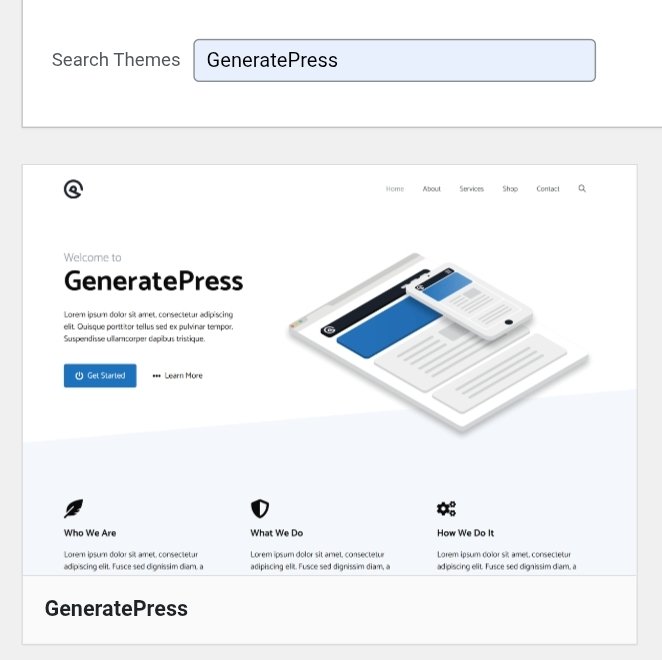
A theme controls how your blog looks, colors, layout, fonts, etc. I recommend starting with a free theme and the best free WordPress themes are:
- Astra which is fast and customizable.
- GeneratePress, lightweight and SEO-friendly.
- Neve is modern and beginner-friendly.
I covered this in detail in my guide on best free WordPress themes for Nigerian bloggers
Installing essential WordPress Plugin
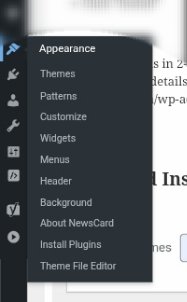
Plugins add features to your blog. Think of them as apps for your phone and these are the must-have plugins for you as a beginners.
- Yoast SEO-Helps your blog rank on Google
- Akismet- Blocks spam comments
- UpdraftPlus – Backs up your blog automatically
- WP Super Cache – Makes your blog load faster
- Contact Form 7 – Adds a contact form
I explained these in my essential WordPress plugins guide
Create Important Pages
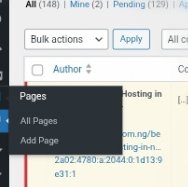
Every blog needs these pages:
- About Page, this tells readers about who you are and why you started the blog.
- Contact Page, add your contact form using the contact form 7 plugin.
- Privacy Policy, this is required if you use ads or collect emails. You can generate one using WordPress’s built-in tool.
Write and Publish Your First Blog Post
This is the moment everything comes together.
- How to write a post:
- Go to Posts → Add New.
- Write your title in the top field.
- Write your content in the editor just like you have it in Microsoft Word.
- Add images by clicking the “+” icon and selecting “Image”.
- Choose a category and create categories like “Recipes,” “Travel,” “Tech,” etc.
- Add tags these are keywords related to your post.
- Scroll down to Yoast SEO section then add your focus keyword.
- Click “Publish”
Congratulations, your first WordPress blog post is live.
Promote Your Blog.
- You’ve published, now people need to find it. Share your posts on:
- WhatsApp Status
- Instagram Stories
- Twitter/X
- Nairaland forums if you have relevant information to post
Long-term traffic strategies
- Write SEO-optimized posts. Google sends free traffic forever.
- Post consistently minimum of 2-3 times per week.
- Build an email list
- Engage with readers in comments
Common Beginner Mistakes to Avoid
- Don’t spend months designing. Start ugly, improve later.
- Publish at least once per week. Consistency beats quality.
- Learn basic SEO from the start. Traffic matters more than design.
- Over 80% of Nigerians browse on phones. Test your blog on mobile.
- Stick to 5-10 Plugins max. Too many slows down your site.
FAQ:
Q: How much does it cost to start a WordPress blog in Nigeria?
A: ₦6,000-₦15,000 total. Hosting (₦500/month) + Domain (₦3,000/year) + optional premium theme (₦5,000-₦20,000). WordPress itself is free.
Q: How long does it take to set up WordPress?
A: 2-3 hours if you follow this guide step-by-step. Most of that time is waiting for hosting activation and WordPress installation.
Q: Do I need coding skills?
A: No. WordPress is designed for non-technical people. If you can use Word or WhatsApp, you can use WordPress.
Q: Can I make money from a WordPress blog?
A: Yes! Through Google Ads, affiliate marketing, sponsored posts, selling products/services, and more. Most Nigerian bloggers earning ₦100,000+ monthly use WordPress.
Q: What should I blog about?
A: Something you’re passionate about AND people search for online. Food, tech, finance, fashion, parenting, travel – pick your niche based on your knowledge and interest.
Resources to help you:
What is WordPress? Complete Guide
Best WordPress Hosting in Nigeria
How to Start a Blog in Nigeria
Conclusion:
You don’t need to know everything or have a perfect design. You don’t need thousands of followers either—what matters is taking the first step.
Pick Whogohost, install WordPress, choose a theme, and publish your first post. You can figure out the advanced stuff later. The hardest part is starting which you’re about to do.
WHY are you starting this blog? Maybe it’s to share what you love, grow a business, or create something meaningful.
HOW will WordPress help? By giving you the platform, the tools, and the potential to turn your ideas into impact.
WHAT do you need to do? Follow the steps above. Just start.
Your blog is waiting. Let’s build it.