 Last year when I decided to launch my blogging business, I faced a common challenge which was figuring out how to build an affordable website. I spoke to a web developer who billed me ₦250,000 for a professional wordPress website. For a newbie like me with a very tight budget, that kind of money was simply out of reach.
That was when I decided to dig deeper. After reaching out to experienced bloggers, I discovered a more affordable option and i could actually build the same professional website myself for less than ₦25,000.
At first, I was skeptical. But one blogger offered to show me exactly how it worked. We sat down together one Saturday morning with my laptop, and by 6pm that evening, my website was live, fully functional, professional-looking, and ready for business. Total cost? Just ₦25,000.
I was surprised because I couldn’t believe it. Have already been looking for ways to get the money or give up entirely. Now I have a website that looked just as good as the ₦250,000 quote, and it was built in one day.
If you’re reading this, you’re probably like me. You know you need a WordPress website for your business, your blog, your portfolio, or your brand. But you’re worried about two things:
The cost: can I really afford a professional website?
The complexity: Can I actually build a website without having a technical skill?
The answer to both questions is yes. In this guide, I’ll show you exactly how to create a WordPress website in Nigeria, the same way I did. Step-by-step. No confusing jargon. Just clear instructions and real costs.
Let’s start building your website. First of all know the purpose of a WordPress website.
WHY you need a WordPress Website
Before getting into the “how,” it’s important to understand the “why” because knowing this will help you stay motivated during the setup process.
Why a Website Matters in 2026? Every serious business, brand, or creator needs a home base online. Social media is great, but you don’t own it.
Instagram can delete your account. Facebook can change their algorithm. But a website? That’s yours forever.
A WordPress website gives you:
Professional Credibility : A business without a website looks amateur. Customers trust businesses with professional websites.
Complete Control- You have total control over your content, your design, your rules. No platform can shut you down or change your terms.
Business Growth- Websites work 24/7. Even while you sleep, people can still discover you, read about your services, and contact you.
SEO Power- WordPress websites rank well on Google. This means free traffic forever. One blog post can bring visitors for years.
Freedom to grow unlimited- Start with a simple website. Later, add a blog, online store, membership area, or booking system. You could use Wix, Squarespace, or Shopify. But WordPress gives you something they can’t, WordPress does it all.
You own everything- Other platforms hold your content hostage. Leave WordPress anytime and take everything with you.
It’s trusted globally- 43% of all websites use WordPress. From small Nigerian businesses to CNN and TechCrunch. If it’s good enough for them, it’s good enough for you too.
With that in mind, the reason to build a WordPress website isn’t just because everyone says you should but because it becomes an asset that grows with you and belongs to you.
Now you know why. Let’s talk about how this changes things for you.
HOW a WordPress website will help you solve your problems
Problem: I can’t afford ₦100,000-₦250,000 for a website
Solution: Build it yourself for ₦20,000-₦30,000. WordPress is free. You only pay for hosting (₦500-₦1,500/month) and a domain (₦3,000-₦5,000/year).
Problem: I’m not technical and i don’t know how to code
Solution: WordPress requires ZERO coding. It’s designed for non-technical people. If you can use Microsoft Word or WhatsApp, you can build a WordPress website.
Problem: What if I need help or something breaks?
Solution: WordPress has the largest support community in the world. Every question you have has already been answered on YouTube, forums, and blogs like this one.
Problem: I need my website to look professional
Solution: WordPress has thousands of free professional themes. Your ₦23,000 website can look just as good as a ₦250,000 custom site.
Problem: What if I need more features as my business grows?
Solution: WordPress scales with you. Add features through plugins, contact forms, booking systems, payment gateways, online stores. Most are free.
WordPress changes the game by going from “I can’t afford a website” to “I built my own professional website for ₦23,000.”
You go from depending on developers to being self-sufficient. You go from invisible online to having a professional web presence that works 24/7.
WHAT You Need to create your WordPress website
Complete Cost Breakdown of what you will need.
- Domain name- ₦3,000-₦5,000/year.
- Web hosting- ₦6,000-₦18,000/year (₦500-₦1,500/month).
- WordPress – Free.
- Theme – Free or ₦5,000-₦20,000 for premium.
- Plugins – Free.
- Your time – 4-6 hours.
- Total Investment: ₦9,000-₦23,000 for the first year.
Now let’s build it step-by-step.
Buy WordPress Hosting (₦6,000-₦18,000/year): Hosting is where your website lives on the internet.
These are the best hosting for Nigerian WordPress websites listed below:
- Whogohost – ₦500/month (₦6,000/year) this is best for beginners
- Qservers- ₦1,200/month (₦14,400/year) suitable for growing sites
- Web4Africa – ₦900/month (₦10,800/year) Good middle option
I covered all options in my WordPress hosting guide.
For this tutorial, I’ll use Whogohost which is the cheapest option
What to do:
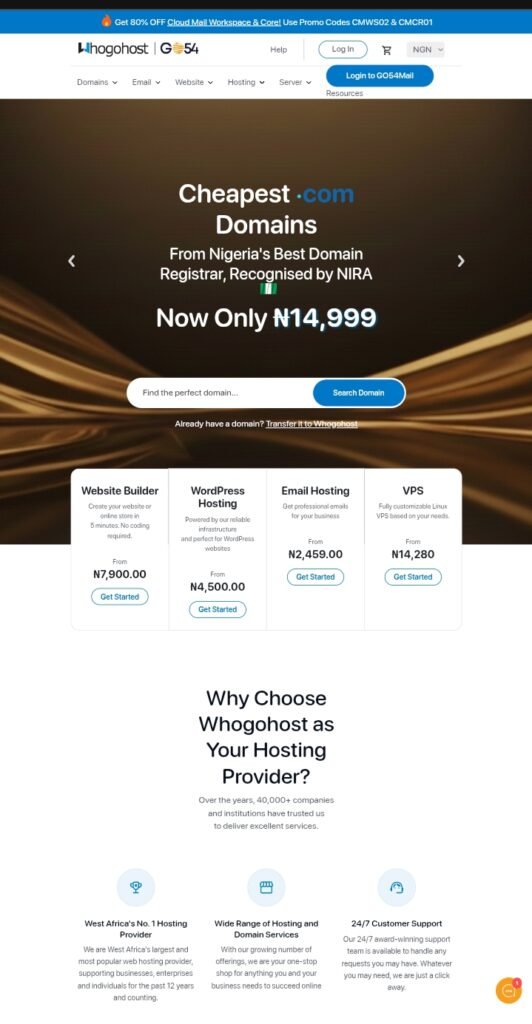
- Go to Whogohost.com.
- Click on Web Hosting.
- Select the basic plan (₦500/month).
- Choose billing cycle you can pay yearly in order to save money.
- Proceed to checkout.
- Complete payment via bank transfer or card.
You’ll receive login details via email within 30 minutes. Cost so far is ₦6,000
First, register your domain name for ₦3,000–₦5,000 per year, this will be your website’s address, like emekasbusiness.com.
In choosing a domain;
- Keep it short and memorable.
- Use .com if available (.com.ng also works)
- Make it relevant to your business/brand.
- Avoid numbers and hyphens.
Good examples:
- NigerianRecipes.com (food blog).
- LagosFitness.ng (gym business).
- TechWithTunde.com (tech brand).
Where to register:
Whogohost includes a free .com.ng or .ng domain with hosting. If you want a .com domain, it costs an extra ₦3,000-₦5,000/year. During Whogohost checkout these;
Select “Register a new domain”, type your desired domain name, check availability and add to cart. The cost so far is ₦9,000-₦11,000.
Next, install WordPress. It’s free and one of the easiest steps.
With Whogohost, check your email for cPanel login details and log into cPanel (it’s a control panel for your hosting).
Next, scroll down to Softaculous Apps Installer, select the WordPress icon, click Install Now, and complete the form.
Choose your domain
- Site Name: Your business/website name.
- Admin Username: Pick a username (not “admin”).
- Admin Password: Create a strong password.
- Admin Email: Your email address.
- Click “Install”, WordPress installs in 2-5 minutes.
- You’ll receive a success message with your website.
URL: yourwebsite.com and Admin login URL:yourwebsite.com/wp-admin. Then save up these details. The cost is free ₦0.
Choose and Install a WordPress Theme (Free or ₦5,000-₦20,000)
A theme controls your website’s designs, layout, colors, fonts, style. For business websites, I recommend free themes:
- Astra – Fast, professional, highly customizable.
- GeneratePress – Clean, SEO-friendly.
- OceanWP – Great for e-commerce or portfolios.
Premium themes this is optional
- Divi (₦20,000) – Drag-and-drop builder, unlimited designs.
- Avada (₦15,000) – Most popular premium theme.
Install Essential Plugins: plugins add features to your website and these are the Must-have plugins for any WordPress website:
- Yoast SEO – Helps Google find your website.
- Contact Form 7 – Adds contact forms.
- Akismet – Blocks spam.
- UpdraftPlus – Automatic backups.
- WP Super Cache – Makes your site faster.
I cover this in more detail in my WordPress plugins guide.
Create Essential Pages, every website needs these pages:
Home Page, which is your main page. These are what visitors see first.
- About Page – Who you are, what you do.
- Services/Products Page – What you offer.
- Contact Page – How to reach you.
- Privacy Policy – Legal requirement.
- Customize Your Website.
Make it look exactly how you want.
- Go to Appearance → Customize.
- Change colors to match your brand.
- Upload your logo.
- Set your homepage (Settings → Reading → “A static page”)
- Create your menu (Appearance →Menus).
- Add social media links.
- This takes 1-2 hours.
Your website structure is ready. Now add content.
- Write your About page
- List your services/products.
- Add portfolio items if applicable.
- Create your first blog post.
- Add contact information.
And once everything looks good:
- Test on mobile because 80% of Nigerians browse on phones.
- Check all links are working.
- Test your contact form.
- Remove “Coming Soon” if you’ve probably added one.
- Share your website.
Congratulations your WordPress website is live
This is the analysis of what I spent while building my website.
- Domain (.com): ₦5,000.
- Whogohost hosting (annual): ₦6,000.
- Premium theme (Astra Pro): ₦12,000.
- Total cost is ₦23,000.
In comparison, hiring a developer would cost ₦100,000–₦250,000 which is much more expensive option.
FAQ
Q: How long does it take to create a WordPress website?
A: 4-6 hours if you follow this guide. My friend did it for me in one Saturday.
Q: Do I really need to pay for hosting? Can’t I use free hosting?
A: Free hosting is terrible – slow, unreliable, and unprofessional. ₦500/month is worth it.
Q: Can I build an online store with WordPress?
A: Yes! Install the WooCommerce plugin (free) and you can sell products online.
Q: What if something breaks?
A: Google your error message – someone has solved it before. Or contact your hosting support.
Q: Should I buy a premium theme?
A: Start with free. You can buy a premium theme only when you need certain features.
Immediate actions to take after Your Website is live
- Submit to Google Search Console, this helps Google find you.
- Set up Google Analytics to track visitors.
- Next, create a Google My Business profile if you run a local business.
- Share on all social media platforms.
First month:
- Publish 4-8 blog posts (for SEO).
- Get feedback from friends/customers.
- Make improvements based on feedback.
- Start driving traffic.
Helpful resources:
Best WordPress Hosting in Nigeria
Conclusion
Remember I thought building a website was impossible without ₦250,000 and technical skills. I was totally wrong.
In one Saturday, for just ₦23,000, I built a professional WordPress website that serves my blog every single day.
Readers find me on Google. My blog website grew. The real difference wasn’t money it was the decision to take action.
WHY do you need this website? To grow your business, establish your brand, be taken seriously online, or start a blog.
HOW will WordPress help? By giving you a professional, affordable platform that works 24/7 and grows with you.
WHAT do you need to do? Follow the steps above. Invest ₦9,000-₦23,000, Spend 4-6 hours and build your website today.
Your website is waiting. The only question is will you build it today or keep waiting?